
Patient Portal Access at Orange Urgent Care

View your visit summary, medications, lab results, diagnostic image reports, and more.

Use our helpful guide to access your patient portal. There are two options: Invite Enrollment OR Self Enrollment. Both options provide you with the same access.
Upon discharge from your urgent care visit with us, you are also provided a document to access your patient portal. The instructions are the same, so feel free to use what is easier for you.

What you can access in your portal?
Medical Chart Notes
Work/School Notes
Physical Forms
WC/NF Forms
In-house test results
Lab Results (sent to outside lab)
Patients may add children under the age of 18 to their portal for easy access
Already have access? Click the button below.

Need access? Follow the instructions below.

Invite Enrollment Instructions:
Your email address, date of birth, and social security number must be given during the registration process. For children under 18 years of age, the parent or guardian’s email address, date of birth, and social security number must be given during the registration process.

You will receive an email from: [email protected]. Click on the link in the email.

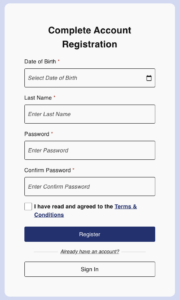
1. Create a Password: Enter your Password and Confirm Password
2. Date of Birth or SSN: Enter your Date of Birth or the last 4 digits of your SSN
3. Agree to Terms: Select the Terms & Conditions box
4. Register: Select the green Register button
5. Connect with Facebook or Google: You may also complete your registration by selecting the blue Facebook or red Google button.

Self-Enrollment Instructions:
Your email address, date of birth, and social security number must be given during the registration process. For children under 18 years of age, the parent or guardian’s email address, date of birth, and social security number must be given during the registration process.

Click This Link: https://pp-wfe-101.advancedmd.com/123301/account/logon

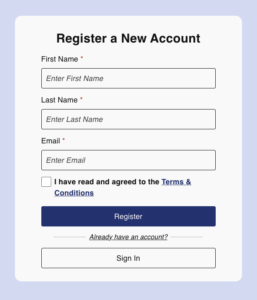
Create an Account: Enter your First Name, Last Name, and email address. This information must match what is on file. Check that I have read and agree to the Terms & Conditions box. Select the blue registration button.

You will receive an email from [email protected]. Click on the link in the email.

1. Create a Password: Enter your Password and Confirm Password
2. Date of Birth or SSN: Enter your Date of Birth or the last 4 digits of your SSN
3. Agree to Terms: Select the Terms & Conditions box
4. Register: Select the green Register button
5. Connect with Facebook or Google: You may also complete your registration by selecting the blue Facebook or red Google button.